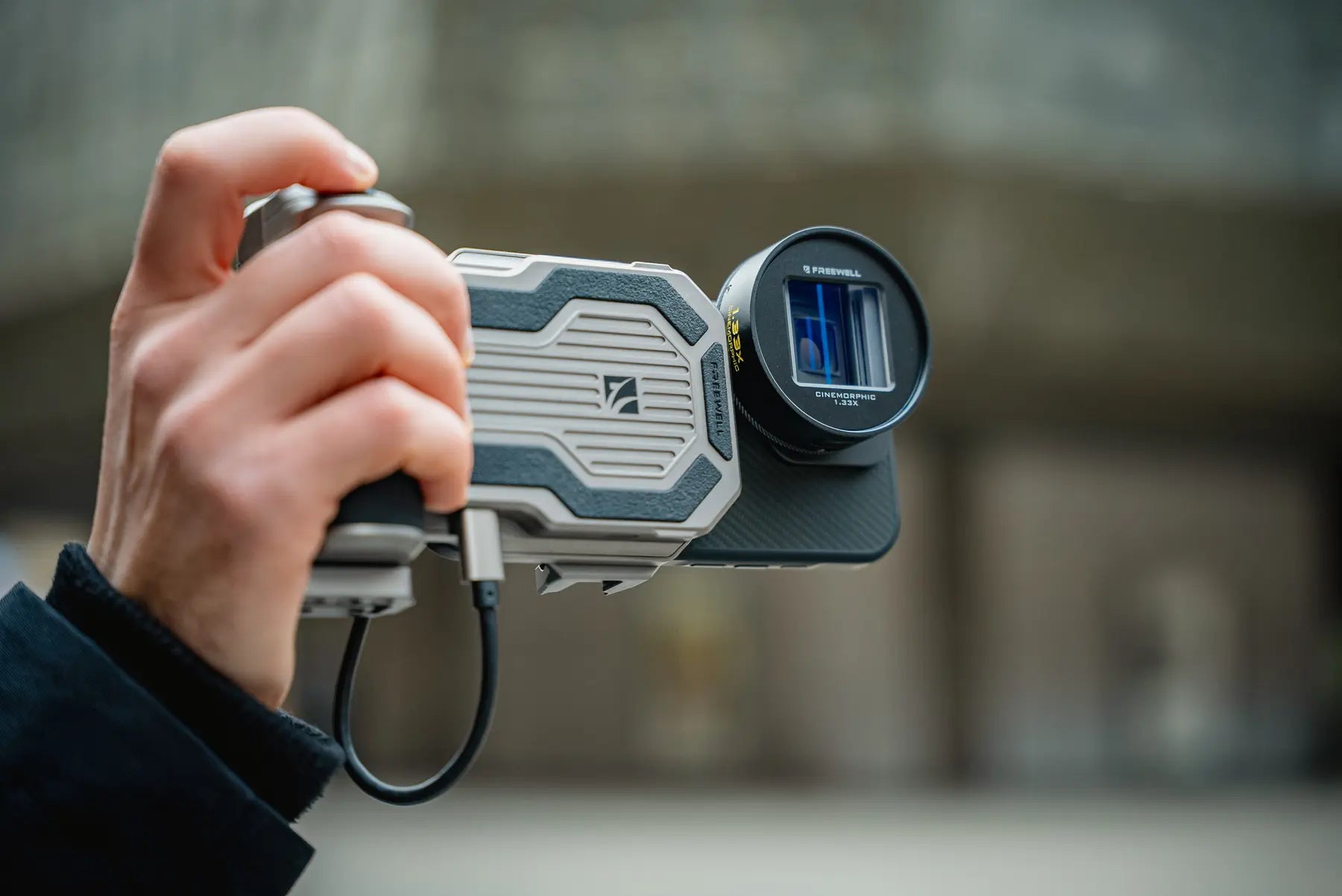
PRO SSD 허브

정상가 $149.99 USD
SKU: FW-PGHB-R-E

스마트폰용 외장 녹화 지원 프로 SSD 허브아이폰 15 프로 & ~ 위에최대 8TB M.2 SSD, 10Gbps USB-C 전송 속도, 60W 충전, ARCA 마운트 및 블루투스 리모컨을 갖춘 이 제품은 이동 중인 크리에이터에게 안성맞춤입니다.

SSD 추천: M.2 SSD를 사용하세요 <소비 전력 5W; 5W 이상의 SSD는 외부 전원 공급 장치가 필요합니다.

휴대폰 클램프 너비: 72-82mm ; 두께: 6-11.5mm

###ssd
정상가 $149.99 USD
###hub
정상가 $19.99 USD
###ssd
$149.99 USD
PRO SSD 허브
특징
  • 스마트폰용 외장 녹화 지원 SSD 허브: 최대 8TB 용량의 M.2 SSD를 지원하여 스마트폰 저장 공간을 확장하세요. 2280, 2260, 2242, 2230 인터페이스와 호환되어 고해상도 녹화 환경에서 대용량 데이터 파일을 관리하는 데 이상적입니다. iPhone 15 Pro와 호환됩니다. & ~ 위에.
  • 다양한 연결 기능을 갖춘 USB-C 포트: 세 개의 전용 USB-C 포트를 갖추고 있어 SSD 데이터, 무선 오디오와 같은 액세서리, 그리고 60W 고속 충전을 지원하여 스마트폰을 전문가용 허브로 활용할 수 있습니다.
  • 콜드슈 & ARCA 마운트 호환성: 콜드슈 및 ARCA 마운트가 장착되어 있어 조명, 마이크, 삼각대 등을 쉽게 부착할 수 있으며, 크리에이터에게 안정적이고 다양한 활용성을 제공하는 환경을 조성합니다.
  • 10Gbps 데이터 전송 속도로 빠른 성능 제공: 고속 Type-C 포트는 빠른 데이터 전송을 지원하여 대용량 비디오 파일이나 방대한 사진 라이브러리 처리에 이상적입니다.
  • 핸즈프리 블루투스 제어: 15미터 범위의 블루투스 리모컨이 포함되어 있어 끊김 없는 사진 및 비디오 촬영이 가능하며, 모바일 콘텐츠 제작에 다용성을 더합니다.
  • 블루투스 리모컨용 (세관 규정으로 인해 배터리는 포함되지 않습니다): CR1632 리튬 배터리가 필요합니다.
상자에?
  • Freewell Pro SSD Hub, SSD Storage Solution for iPhone, Pro Res Recording.
    프로 SSD 허브
  • USB C Cable for Freewell Pro SSD Hub
    충전 케이블
  • Freewell Pro SSD hub user manual.
    사용 설명서
시간 제한 보증

안심하고 구매하세요. 모든 Freewell Pro SSD 허브는 보증이 제공됩니다. 12개월 제조상의 품질 문제에 대한 보증.

와 잘 어울린다
Freewell Pro SSD Hub mounted to a smartphone filmmaking rig with an anamorphic lens and wireless microphone

Mobile recording. Unrestricted.

Your phone captures ProRes.Give it room to breathe.

Record to your own M.2 SSD, keep the phone powered, connect wireless audio and mount the complete rig around one compact hub.

Built for external smartphone recording iPhone 15 Pro & above
8TBM.2 SSD support
10GbpsUSB-C data transfer
60WPD charging
Dedicated USB-C ports

The complete signal path

One hub. Three jobs.Zero cable chaos.

Storage, power and audio each get a dedicated connection, keeping the mobile filmmaking workflow clear from setup to final take.

Smartphone filmmaking rig using the Freewell Pro SSD Hub while recording outdoors
10Gbps data path

Apple ProRes / external media

Keep the detail. Skip the storage ceiling.

Record high-resolution footage to your own M.2 SSD instead of filling the phone. The 10Gbps USB-C data path is built to move large video files without slowing the shoot down.

Three USB-C ports

Every port has one clear purpose.

Three dedicated USB-C ports on the Freewell Pro SSD Hub
01 / DATA

External M.2 SSD

Move high-resolution video through the 10Gbps USB-C data path.

Freewell Pro SSD Hub PD60W port with a USB-C cable connected
02 / POWER

60W PD charging

Power the phone and support longer recording sessions.

Wireless microphone receiver connected to the Freewell Pro SSD Hub rig
03 / ACCESSORY

Wireless audio

Keep a compatible receiver connected within the same rig.

Install your own drive

One hub.Four M.2 sizes.

Choose the capacity and form factor that fits your workflow. The Pro SSD Hub accepts M.2 2230, 2242, 2260 and 2280 SSDs up to 8TB.

Best with ≤5W M.2 SSDsDrives above 5W require external power.
Freewell Pro SSD Hub opened to show its internal M.2 SSD compartment
2280M.2

Full-size form factor

exFAT

Before the first recording

Format the SSD for your phone.

For iPhone compatibility, prepare the drive as exFAT. Always back up existing files first because formatting erases the SSD.

Freewell Pro SSD Hub on a complete smartphone filmmaking rig at sunset

A rig that moves with the shot

Handheld now.Locked down next.

ARCATripod-ready base
Cold shoeLight or microphone
1/4″More rigging options

Built for the field

The setup changes. The hub stays.

Freewell Pro SSD Hub held in a compact handheld filming setup
01

Handheld freedom

Storage, power and sound kept close to the phone.
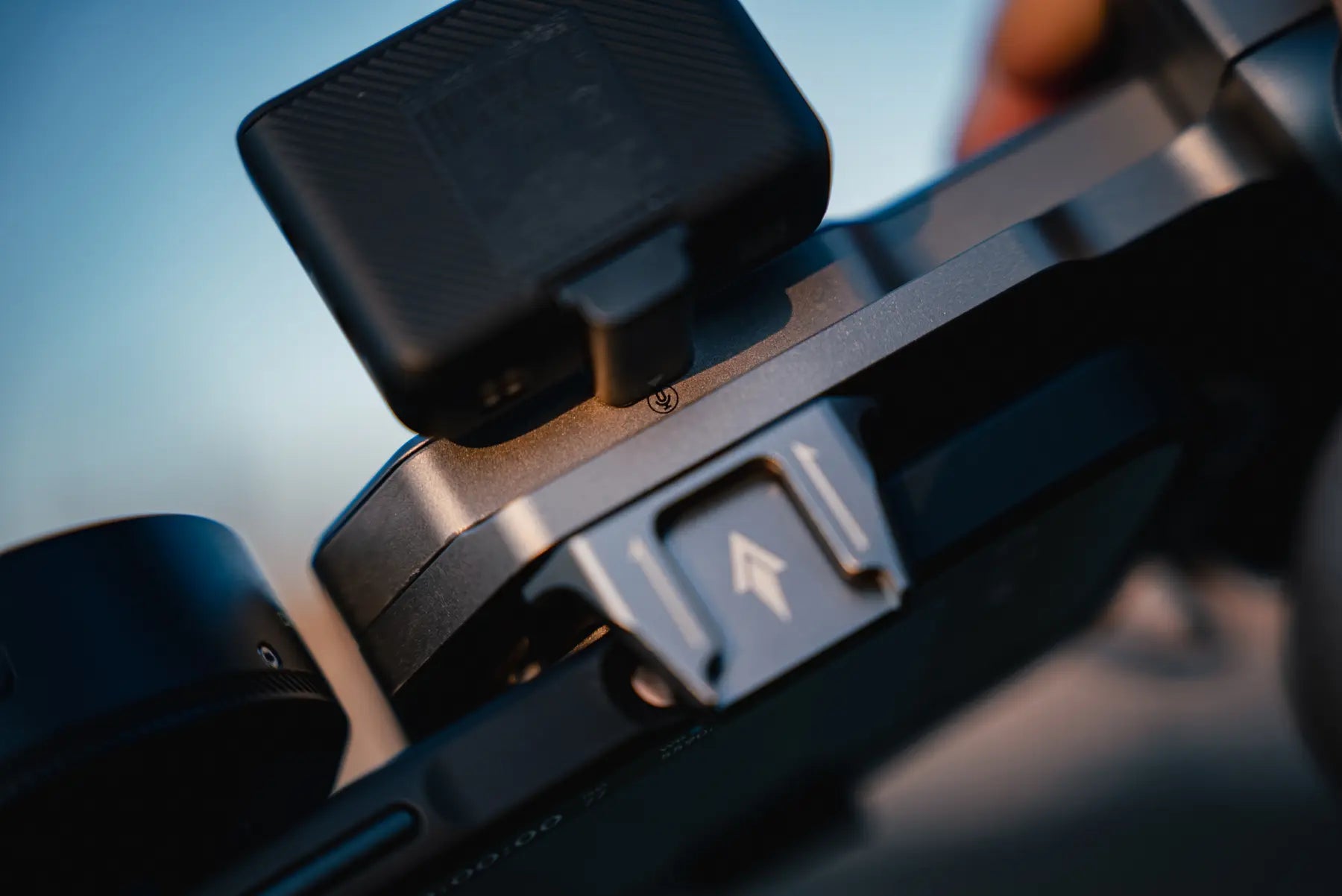
Accessory attached to the cold shoe of the Freewell Pro SSD Hub
02

Accessory ready

Add the microphone or light the scene needs.
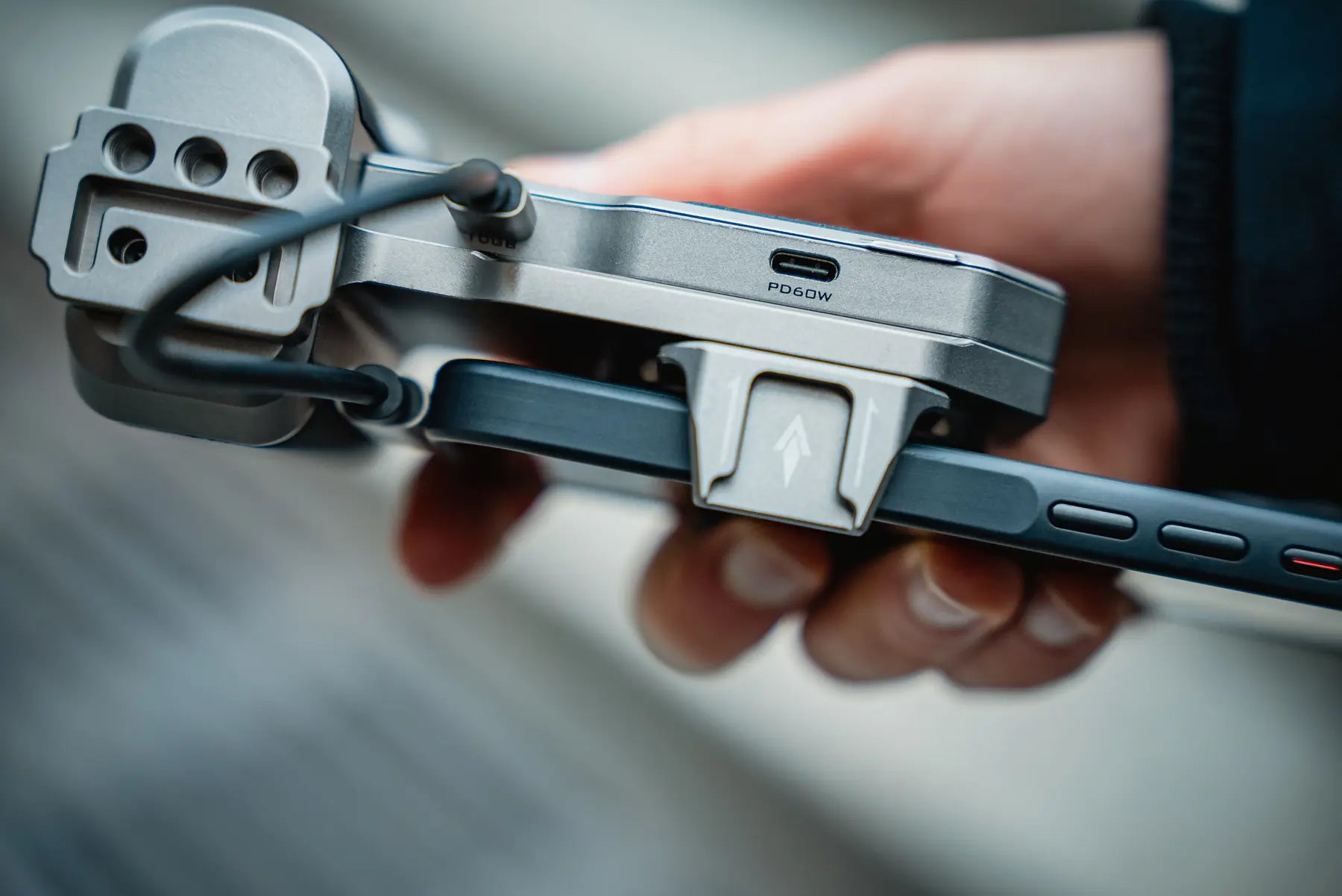
Freewell Pro SSD Hub clamped securely around a smartphone
03

Secure phone clamp

Fits phones 72–82mm wide and 6–11.5mm thick.
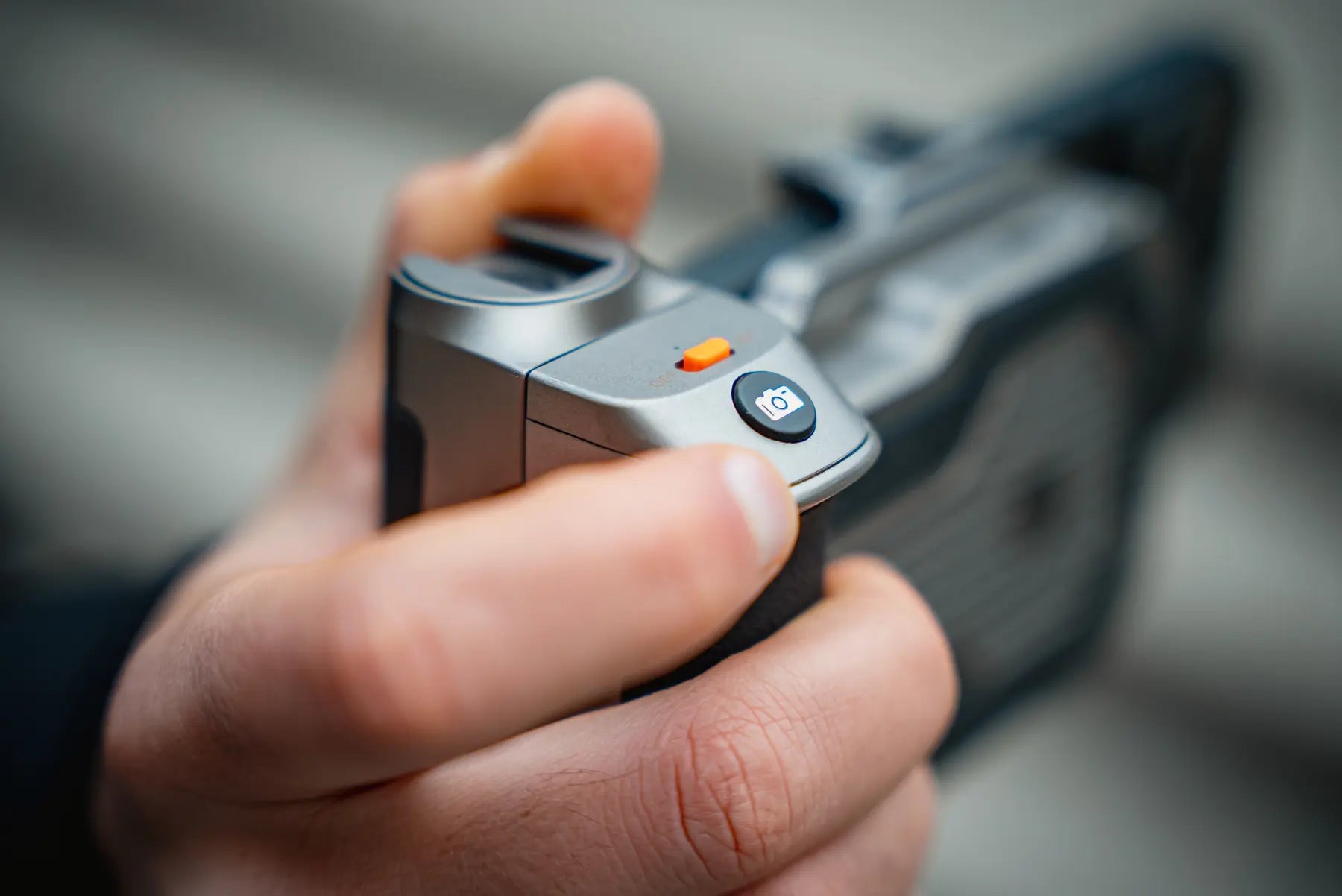
Thumb pressing the camera button on the Pro SSD Hub Bluetooth remote

Bluetooth shutter

Step back.Stay in control.

Trigger a photo or video from up to 15 meters away. Useful for locked-off shots, solo filming and moments when touching the rig would disturb the frame.

15mListed control range
Requires one CR1632 battery. Battery is not included.

Check the recording chain

Built for phones that record to external storage.

The hub provides the connection and storage path. The phone, recording format and camera app must also support external recording.

APPLE

iPhone 15 Pro & above

For supported Pro models and external recording workflows.

SAMSUNG

S25 Ultra & above

Currently listed by Freewell for compatible external recording.

OTHER USB-C PHONES

Confirm before recording

Check external media support in both the phone and camera app.

72–82mmPhone width
6–11.5mmPhone thickness

Measure with the case installed if you plan to keep it on.

Pro SSD Hub FAQ

Before you build the rig.

Clear answers about iPhone ProRes recording, Android compatibility, M.2 SSD requirements, power and setup.

01What does the Freewell Pro SSD Hub do?

It combines external M.2 SSD storage, 10Gbps USB-C data transfer, 60W PD charging, an accessory connection, a phone clamp and multiple mounting options in one compact smartphone filmmaking hub.

02Can I record Apple ProRes directly to an external SSD?

Yes. The Pro SSD Hub is designed for smartphones that support external recording, including iPhone 15 Pro and later Pro models listed by Freewell. Your phone, recording format and camera app must support recording to external media.

03Does the Pro SSD Hub work with Android phones?

Freewell currently lists Samsung S25 Ultra and above. For any other USB-C phone, confirm that the phone and your camera app support external recording before use.

04Which M.2 SSD sizes are supported?

The hub supports M.2 2230, 2242, 2260 and 2280 form factors, with capacity up to 8TB.

05What SSD power rating should I use?

For the simplest setup, use an M.2 SSD with power consumption of 5W or less. An SSD that draws more than 5W requires an external power source.

06How should I format the SSD for an iPhone?

Use exFAT when preparing the SSD for iPhone compatibility. Back up any existing files before formatting because formatting erases the drive.

07Is an M.2 SSD included?

No. You install your own compatible M.2 SSD. The listed box contents are the Pro SSD Hub, charging cable and user manual.

08What battery does the Bluetooth remote use?

The remote uses one CR1632 lithium battery. The battery is not included because of customs shipping restrictions. The listed control range is up to 15 meters.

09What phone sizes fit the built-in clamp?

The clamp supports phones 72–82mm wide and 6–11.5mm thick. Measure the phone with its case installed if you plan to keep the case on.

Complete Freewell Pro SSD Hub smartphone filmmaking setup

Capture. Store. Create.

More room for the story.

External storage, continuous power and a cleaner mobile filmmaking workflow.